You ask, Claudio takes care of it.
Claudio is a contact in your WhatsApp, with no app to install. Write to it like you'd write to a friend: it replies in your language, in English, Italian, German, French, Hebrew or Arabic.
Every day
The small things that fill a day, all in one chat.
Reminders on time
Say what and when: Claudio writes to you at that exact time. Ask to see your reminders, or to cancel one, whenever you like. Under the reminder you tap “Done” or “In 1 hour”: tap “In 1 hour” and the reminder comes back an hour later.
You can also ask it to keep an eye on something, like “let me know when the concert tickets go on sale”: Claudio checks once a day and writes to you only when something has changed.
remind me to buy flowers at 5:30pm
Done: I'll message you at 5:30pm.
thanks!
❤️⏰ Reminder: buy flowers
In 1 hour
⏰⏰ Reminder: buy flowers
Deadlines from a photo
Snap a bill, a fine or a document to renew, or send the PDF: Claudio tells you how much and by when and, with one yes, sets reminders before the deadline. It doesn't keep card numbers, IBANs or reference codes.
have a look at this bill
It's the electricity bill: €84.20, due by 14 December.
I'll set two reminders for «Electricity bill, €84.20 — due 14/12»: on 7 December and 13 December, at 09:00. Okay?
yes
Done: I'll remind you of «Electricity bill, €84.20 — due 14/12» on 7 December and 13 December, at 09:00.
Save to Drive
Send Claudio a photo, a PDF or another file with “save it to Drive” in the same message: it goes into your Google Drive, in the Claudio folder, with today's date and a clear name, and Claudio finds it again when you ask. The first time, you connect Drive with the “Connect Drive” button, then send the file again. Claudio sees only the files it saves, and keeps no copies.
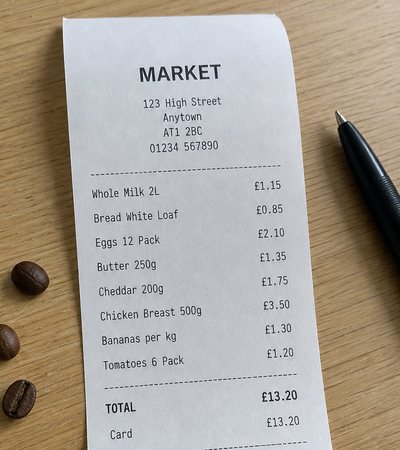
save it to Drive
Saved to Drive: Claudio/Receipts/2026-11-14 Market groceries.jpg
drive.google.com/file/d/…
what did I save to Drive this week?
This week I saved:
2026-11-14 Market groceries.jpg
drive.google.com/file/d/…
2026-11-12 Washing machine warranty.pdf
drive.google.com/file/d/…
It remembers
People, birthdays and what matters to you. It reminds you of birthdays every year, the day before. Ask what it remembers whenever you like, and it forgets anything you ask it to.
remember that Luca's birthday is 12 March
Done: every year on 11 March at 6pm I'll remind you of Luca's birthday.
what do you remember about Luca?
His birthday is on 12 March, and he loves sushi.
In the morning
A briefing on your day at 7:30 in the morning (on Free, on the days there's something to tell you). Move it to a time that suits you, or write STOP to turn it off.
Good morning! Two reminders today: call Marta at 1pm, and the flowers at 5:30pm.
from tomorrow, send the morning one at 8
Done: from tomorrow, at 8.
Messages for others
Claudio writes the message for you. You tap it and send it from your own WhatsApp.
tell Sara I'm 10 minutes late
Here's your message:
Hi Sara, I'm running 10 minutes late. Sorry, see you soon!
Tap the link to send it from your WhatsApp: wa.me/…
Your calendar
Claudio tells you what your day looks like, and adds events to your Google Calendar. To move or delete one, it waits for your yes.
what have I got tomorrow?
The dentist at 3pm, and dinner at Marco's at 8pm.
add the gym on Friday at 10
Done: the gym is in your calendar on Friday at 10.
Done for you
The bigger things too. Claudio does the searching, you choose, and you pay or book yourself, from the link it sends you.
Shopping online
Claudio searches Shopify shops that deliver to you and shows you the best offers as photo cards. Pick with one tap, confirm with a yes, then pay on the shop's own page: Claudio never pays.
I need some warm wool socks
Here are the best offers:
 Merino wool, greyEUR 16.90★ 4.7 (212)
I'll take no. 1
 Wool, 3 coloursEUR 19.90★ 4.5 (96)
I'll take no. 2
 Nordic patternEUR 14.50★ 4.8 (57)
I'll take no. 3
I'll take no. 1
Merino wool, grey, from Happy Knits: EUR 16.90 before shipping, which is added on the shop's page when you enter your address. You pay there: I never see your card.
Do you confirm the order for EUR 16.90 (1 item): «Merino wool, grey» from «Happy Knits»? You pay on the shop's page.
Yes
Here is the link to pay on the shop's page for the order for EUR 16.90 (1 item): «Merino wool, grey» from «Happy Knits». There you enter your name, address and payment; the order exists only once you pay, and I never see your card.
Stays
Claudio sends you Booking.com and Airbnb search links for your city, dates and number of guests. Prices and availability are on those sites: you choose and book there.
a flat in Lisbon, 12 to 15 March, for two
Here are your two searches, already filled in:
booking.com/…
airbnb.com/…
Prices and availability are on the sites: you choose and book there.
 Alfama, river viewSee more
 Baixa, with balconySee more
 Graça, roof terraceSee more
A table in a minute
Say the restaurant and when (if you have none in mind, it suggests a few): Claudio sends you the place on Google Maps and the sentence to say on the phone in the restaurant's language, with a translation. In the US, the UK and Ireland it also sends an OpenTable link with the party size and time filled in. You make the booking; then, if you like, Claudio adds it to your calendar.
a table for 2 at Bistrot Rosalie in the Marais in Paris, Saturday at 8pm
I can't phone for you yet, but it'll only take you a minute: google.com/maps/… On the phone you can say:
«Bonsoir, je voudrais réserver une table pour 2 personnes samedi à 20 h, au nom de …»
(Good evening, I'd like to book a table for 2 on Saturday at 8pm, under the name …)
done, booked!
Great! Shall I add it to your calendar?
Flights and trains, sorted
Forward the confirmation as a PDF, a photo or text: with one yes, Claudio reminds you when to check in for your flight and when to leave, and adds the trip to Google Calendar if you've connected it. Booking codes and ticket numbers never go into the reminders or the calendar.
here's my flight to Lisbon
I'll add «Flight Zurich → Lisbon» to your calendar and set two reminders: check-in Friday 11 December at 07:40 and «time to go» Saturday 12 December at 04:40. Okay?
yes
Done: «Flight Zurich → Lisbon» is in your calendar, and I'll remind you: check-in Friday 11 December at 07:40 and «time to go» Saturday 12 December at 04:40.
Train times
Ask it for a train, like “to Paris from Zurich tomorrow”: Claudio reads the official timetable for that day and tells you departures, arrivals, duration, changes, train numbers and platform. If you don't say where you're leaving from, it asks. It knows the trains that touch Switzerland and some routes across Europe; for the others it searches the web. Every answer has a link to SBB's page with the stations, day and time already filled in: there you see the prices and buy yourself, Claudio never buys tickets. These are scheduled times: check before you leave.
a train to Paris from Zurich tomorrow
Tomorrow from Zürich HB to Paris Gare de Lyon:
07:34 → 11:37 direct, 4 h 03, TGV Lyria, platform 16
11:34 → 15:37 direct, 4 h 03
13:02 → 17:56 1 change in Basel
Prices and tickets on SBB's page, already filled in: sbb.ch/…
Cards, images and your photos
A card, an invitation, a postcard, a drawing: Claudio makes it with AI and sends it to you in the chat. Send it a photo, a selfie too, and say what to change: “put me on a beach”, “add sunglasses”, “make it a 1950s photo”. The day before a birthday you've told it about, it offers to get a birthday message and a card ready for you. Each image and each edit uses credits.
Tomorrow is Sara's birthday 🎂 Shall I get a birthday message and a card ready for you?
yes, with flowers
Here's your message:
Happy birthday, Sara! Wishing you a day full of smiles 🎉
Tap the link to send it from your WhatsApp: wa.me/…

🎨 Made with AI.
WhatsApp groups Coming soon
Groups aren't live yet. This is how they will work: Claudio creates a group with you and the people you choose, and stays in it to suggest meeting times and remind everyone of deadlines.
ClaudioHi Luca and Giulia! How about the first meeting on Thursday at 10?
GiuliaWorks for me!
Perfect, Thursday at 10
ClaudioSet: Thursday at 10. On Wednesday I'll remind you all to send the draft.
With your AI Coming soon
The connection isn't live yet. This is how it will work: Claudio also works inside Claude, ChatGPT and other assistants, through MCP. You ask there, and Claudio takes care of it on WhatsApp.
How it works with your AIYour AI passed me a reminder: tomorrow at 9 I'll remind you to send the report.
It's 9 o'clock: time to send the report.
sent, thanks!
Invite a friend
Write “invite a friend” to Claudio: it prepares a message with your personal link. You send it yourself, from your WhatsApp, to whoever you like: Claudio never writes to your contacts. When your friend is new to Claudio and starts their first paid month, you both get gift credits.
Missions
Your first steps with Claudio earn you gift credits: your first reminder, your first voice note, the first birthday you ask it to remember, and more. Write “missions” to see which ones you have left.
You stay in charge
Claudio does a lot, but never behind your back.
- It asks firstClaudio asks for your yes before deleting anything, moving an event or sending you a shop's link to pay. It never pays for you and doesn't write to other people: you send the messages it drafts for them yourself.
- Stored in EuropeClaudio stores your notes, reminders and chats in Europe. We don't sell them, we don't use them for other companies' ads, and Claudio's AI doesn't use them to train. You can delete everything whenever you want from your account page. All the details, including the providers that help us reply to you, are in the privacy notice.
- No ads for others, no trainingYour data is never used for other companies' ads or to train AI.
- STOP, any timeWrite STOP and the daily messages stop. Reminders you've set still arrive.
- Your accountLog in on the site with your WhatsApp number, no password needed, or ask Claudio in the chat for the button to sign in. In your account you can see what Claudio keeps and change it.Log in
- Delete everythingFrom your account you can delete everything at once: the account and all Claudio knows about you.Log in
Claudio is one message away.
Say hi in your language. There's nothing to install.